Iðunn

Old terminal techniques, brought back to life

Iðunn.
Old gods.
New life.

I’m Adam DePrince, an old programmer with 37 years in the terminal. I like the MS-DOS aesthetic, text-based applications, and software you can get around with a keyboard. These are the open-source tools I’m building to restore those old gods to glory.

All my work is intended to be medium- and narrow-band friendly.
My GSP-1700 setup: working at 9.6 kb/s

[ GOBLIN + APPLE ]
Goblin, my fluffy black-and-white Silkie chicken mascot, holding a golden apple between its wings.
Goblin has brought an apple.
The old gods have work to do.
IÐUNN / GOBLIN REACTORRENEWAL IN PROGRESS

37 YEARS of terminal experience

08 PROJECTS in this collection

OPEN SOURCE built to be used

01 / The working directory

Tools for a life in the terminal.

Text. Graphics. A connection home.

01 /Terminal emulator

Silkie

More of the computer, through the terminal.

My fork of kitty, with new terminal protocols for pen and touch input, vector graphics, HDR color, and display timing. It’s the foundation for giving text-based applications richer ways to draw and interact.

02 /Remote connection

Goblin Skiff

Mosh fork, with a much bigger toolkit

My substantially extended Mosh fork for slow and unreliable links. It adds agent forwarding, file transfer, and support for kitty and Silkie graphics, alongside compression and bandwidth pacing. The goal is to keep a remote session useful when every byte matters.

03 /Mail

Skaði

A little of Pine’s spirit, carried forward.

My Alpine fork brings inline images, rich-text composition, and offline mail to the familiar keyboard-driven mail client. Support for kitty and Silkie keeps it at home alongside the rest of these tools.

04 /Word processing

Egill

WordPerfect muscle memory. Modern text.

A clean-room WordPerfect 5.1-style word processor with a Unicode core, familiar function keys, native document support, and inline equation and image previews. An early prototype, still growing into the old program’s considerable shoes.

05 /Terminal desktop

Hliðskjál

A little DESQview in your terminal.

Also called Odin. A terminal multiplexer in the territory of tmux and screen, with DESQview-style overlapping windows. Move and resize your workspace, detach and return to your sessions, and use full kitty graphics inside the windows.

06 /E-paper terminal

Inkline

A shell on the reMarkable 2.

A terminal emulator for the reMarkable 2, bringing shells, text applications, and terminal graphics to e-paper. Use a Type Folio or an external keyboard and take the terminal to a different kind of screen.

07 /Graphical desktop viewer

Goblin Scry

The graphical desktop can come, too.

View RDP, VNC, and local X11 or Wayland desktops inside a terminal that supports kitty graphics. Scry divides the picture into character-sized cells and resends the cells that change. It also works inside Hliðskjál (Odin).

08 /Linux on Android

GoblinReactor for Android

Linux and a graphics terminal, in your pocket.

My Linux deployment environment for Android runs Debian with a real User-Mode Linux kernel and a native Silkie terminal. It supports kitty graphics, multiple terminal sessions, and pen and touch input, with Linux files kept between app updates.

Follow each project’s link for its capabilities, installation instructions, and source.

02 / Why Iðunn?

An apple for the old gods.

pine  ·  talk  ·  C:\>

The name is a joke. In Norse mythology, Iðunn’s apples keep the gods young. I’m resurrecting old computing techniques: the terminal, text-based applications, and the ways of working I still enjoy. Restoring the old gods to glory, one program at a time.

I’m an old programmer with 37 years of terminal experience. I have fond memories of reading mail in Pine and talking to people with Unix talk. My MS-DOS days were spent with a Hercules display or a Toshiba 3100SX. For me, those memories are orange: glowing text, simple menus, and a keyboard.

That’s still how I want to use a computer. I also want inline images, useful graphics, good input, and the ability to carry a session between machines. So I’ve been adding capabilities to the terminal and building applications that use them.

The result is this collection: a terminal, a connection, mail, a word processor, a windowing workspace, a desktop viewer, and ways to take them onto e-paper and Android. Familiar ideas, with plenty left to build.

03 / Away from the desk

9.6 kb/s

GSP-1700 satellite phone
A very practical design constraint.

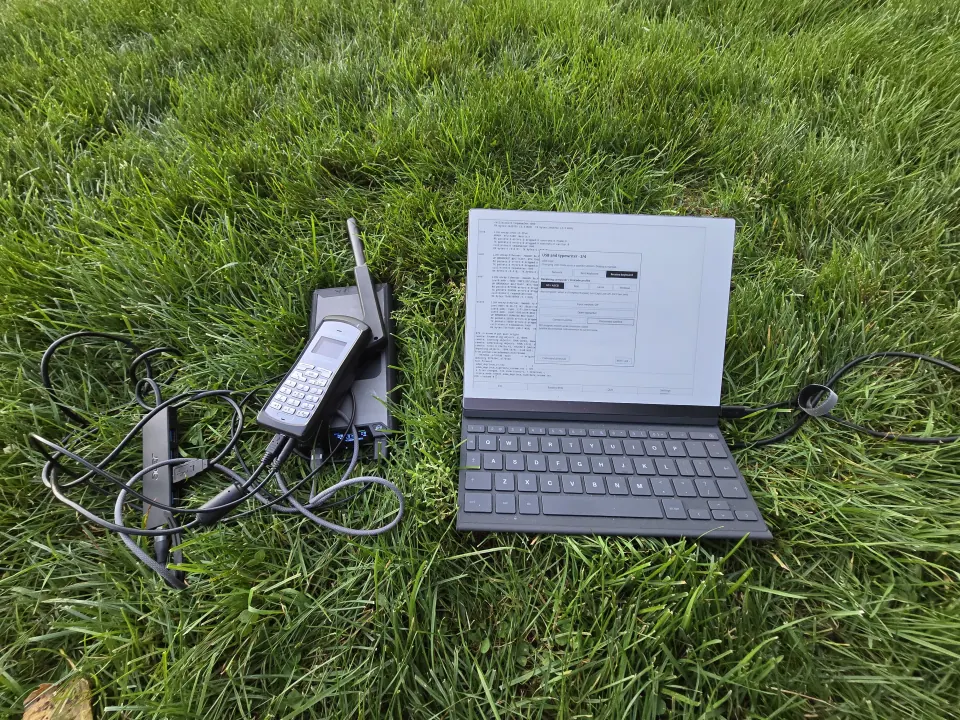
My reMarkable 2 running Inkline on the grass, beside the GSP-1700, power bank, powered USB hub, and cables.
My office on the grass. Photograph from the field notes.

Past the last café’s Wi-Fi.

I like to hike, and I want to keep working beyond cellular coverage and power outlets. I carry a reMarkable 2 running Inkline, a GSP-1700, a power bank, and a powered USB hub. The heavy computation can stay on a remote machine.

At 9,600 bits per second, shells and small code changes are still useful. Inkline’s terminal proxy keeps unrelated tablet updates and book sync off the satellite link.

Unlimited airtime doesn’t mean unlimited battery. I want to spend the connection on my work, then disconnect when I’m done.

Read “Freedom at 9,600 Bits per Second” ↗